Conditional logic in forms: 7 examples
How conditional logic works in online forms: the parts of a rule, which rule to use when, seven examples to copy, and the bugs to test for before launch.
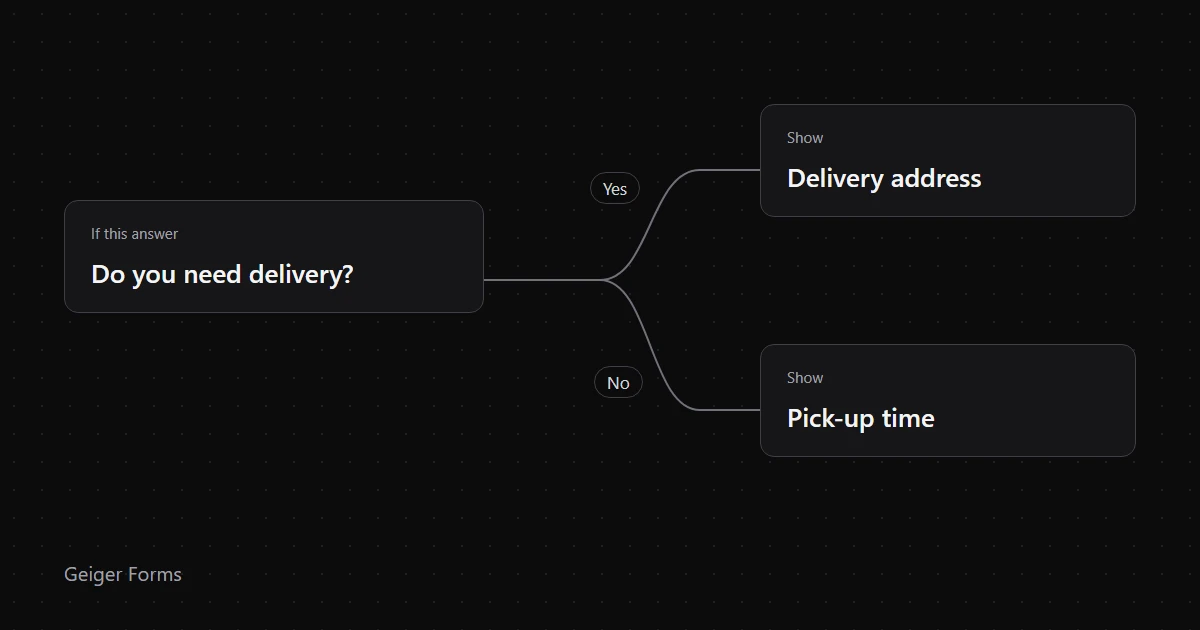
Conditional logic is a set of if-then rules that changes a form based on earlier answers. Someone who picks "Support" gets a question about the product, and someone who picks "Sales" gets a question about company size. Each person answers fewer questions, and your team still collects what it needs.
The ideas below apply in most form tools, though the rule types on offer vary. The last section shows how we built them into our own form builder.
Key Takeaways
- Every rule has three parts: the answer it watches, the test it runs and the action it takes.
- Show or hide a field for one simple follow-up. Use a page condition or a jump for anything longer.
- Before launch, test for stale answers from hidden questions, required fields nobody can see and rules that only run in the browser.
- Test every path, then open the stored response. A form can look right on screen and still save the wrong data.
What is conditional logic in a form?
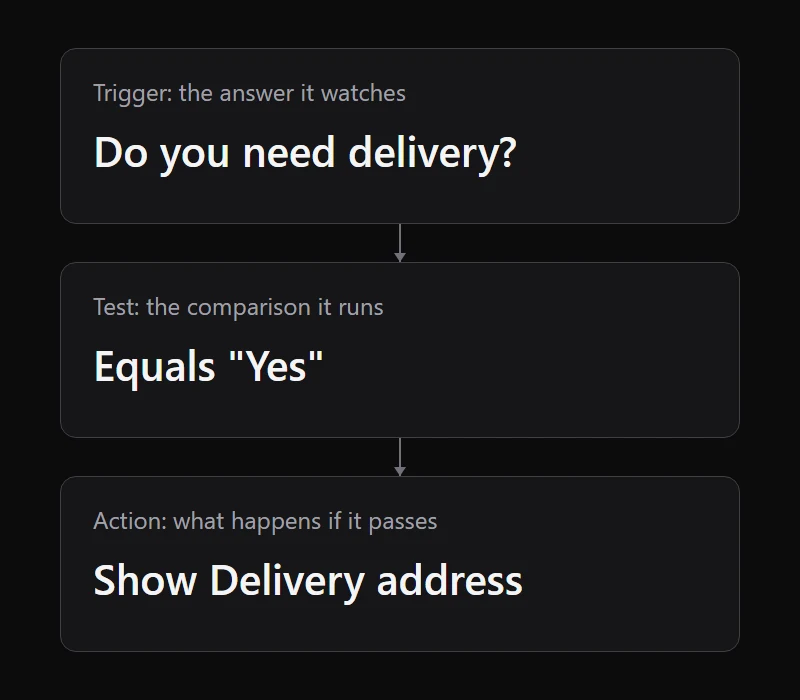
Conditional logic makes a form respond to answers as they are given. Each rule has three parts:
- Trigger: the earlier answer the rule watches.
- Test: the comparison, such as equals, contains or greater than.
- Action: what happens when the test passes, such as showing a question or skipping a page.
Written out, a rule reads like a sentence: if Do you need delivery? equals Yes, show Delivery address.
Skip logic, branching and logic jumps
These terms overlap, and vendors don't use them consistently. As a rough guide, display logic shows or hides something on the current page, skip logic moves people past questions, and branching sends different groups down different paths. Conditional logic usually covers all three.
Here is what each vendor's documentation described on 2 November 2026, plus our own product. This covers naming and scope, and isn't a full feature comparison.
- Google Forms, "Go to section based on answer": sends people to a section or submits the form. It's only available for Multiple choice and Dropdown questions.
- Jotform, conditional logic: shows or hides fields, updates or calculates values, requires fields, skips or hides pages, and changes the thank-you page or email recipient.
- Typeform, Logic Jumps in its developer docs: jumps to another field or thank-you screen, triggered by an answer or a hidden field value.
- Geiger Forms, conditions, jump rules and named outcomes: shows or hides fields and pages, jumps ahead, and sets a named outcome with its own ending.
Which type of rule should you use?
Pick the smallest rule that does the job. A form with one extra field is easier to test than a form with a new path.
| What you need | Rule to use | Example |
|---|---|---|
| One short follow-up | Show or hide a field | "Other" reveals "Please specify" |
| A whole section doesn't apply | Skip a page | No delivery skips the delivery page |
| The person is finished early | Jump ahead or to the end | Someone who isn't eligible jumps to the end |
| People need different results | Change the ending | A quiz score picks the result screen |
| Your team handles responses differently | Route the response | Urgent requests get a high priority |
Move the follow-up to the next page when it has more than one part. The GOV.UK Design System says to keep revealed questions simple: "If the related question is complicated or has more than one part, show it on the next page in the process instead." Its researchers found that screen reader users managed simple revealed questions, while users in testing got confused by complicated ones.
Skipped pages also change your step count. The W3C recommends that a multi-step form explains how many steps will follow and shows progress at each one. If a rule can drop a page, make sure the indicator updates, so nobody sees "step 3 of 5" and then finishes at step 4.
Seven conditional logic examples you can copy
Each example lists the trigger, the rule and the thing to watch for. For events, we also have six conditional registration form examples.
1. A contact form that asks the right follow-up
- Trigger: What do you need? Sales, Support, Billing or Other.
- Rule: Sales shows company size. Support shows product and order number. Billing shows invoice number.
- Watch for: a catch-all "Other" with no follow-up. Give it a free-text question so those messages still make sense.
2. A support request that flags urgent problems
- Trigger: Can you still work? Yes or No.
- Rule: No shows What is blocked?, then routes the response as high priority.
- Watch for: a priority label that nobody sees. Pair it with a notification and check that it arrives.
3. An NPS survey with a different question per score
- Trigger: How likely are you to recommend us? 0 to 10.
- Rule: at most 6 shows What should we fix first? At least 9 shows What do you value most?
- Watch for: text fields used for scores. The field must be numeric for "at least" and "at most" to work.
4. A job application that changes by role
- Trigger: Which role are you applying for?
- Rule: Designer shows a portfolio upload. Engineer shows a code sample link.
- Watch for: extra personal data. Ask only for what the role needs, and keep the shared questions the same for every applicant.
5. An order form with delivery or pick-up
- Trigger: How would you like to get your order? Delivery or Pick-up.
- Rule: Delivery shows the address page. Pick-up skips it and shows a time slot.
- Watch for: totals worked out only in the browser. If the choice changes the price, the amount charged should be recalculated on the server.
6. An eligibility screener that ends early
- Trigger: Are you based in the region this programme covers? Yes or No.
- Rule: No jumps to the end and shows a custom ending.
- Watch for: a generic "Thanks!" screen. Say why the person can't continue and what they can do next. Put the screening question first so nobody answers ten questions for nothing.
7. A scored assessment with different results
- Trigger: the total score.
- Rule: at least 80 shows the advanced result. At least 50 shows the intermediate result. The default ending covers everyone else.
- Watch for: rule order. Typeform's docs say the first condition met triggers the jump and later ones are ignored, and Geiger Forms' outcomes work the same way. Check the highest band first, or a score of 90 passes "at least 50" and gets the wrong result.
Where conditional logic goes wrong
These failures can pass a quick click-through, so test for each one.
Answers from hidden questions stay in the data
Say someone picks "Allergy", types the details, then changes their answer to "None". The question disappears. Check whether your tool still saves what they typed, because if it does, your caterer sees an allergy that doesn't exist.
To test it, answer a follow-up, change the trigger so the follow-up hides, submit, and open the stored response. Then check any autosaved drafts too, since they may be stored separately. This can matter for privacy as well: Article 5(1)(c) of the GDPR requires personal data to be "limited to what is necessary". Ask whoever handles data protection at your organisation how long to keep those drafts.
Required questions nobody can see
A required field on a hidden branch can block submission with an error the person has no way to fix. A required question should only count as required while it is visible. To test it, take the path that hides the question and try to submit.
Rules that only run in the browser
If logic only runs on the page, a script or edited request can get around it. OWASP's guidance on input validation is direct: "Client-side validation is bypassable; use it for immediate feedback." This matters most when logic decides a price or who qualifies.
When you compare tools, ask whether conditions are checked again when the response is submitted. Treat URL-prefilled hidden fields with the same care. They are useful for tracking a campaign, but anyone can edit a URL, so they shouldn't decide price or access.
Follow-ups that depend on a hidden question
Rules can chain: question C depends on B, and B depends on A. If A's answer hides B, then C should hide too, even though B still has an old answer. To test it, fill in the whole chain, change A, and check that both follow-ups disappear.
Free-text triggers
A rule can't reliably match "yes", "Yes!" and "yeah". Use a choice or number field for anything that drives logic.
Too many independent branches
Paths multiply faster than rules do. Five independent yes-or-no questions create 32 possible combinations. Grouping questions into pages that are skipped together gives you far fewer paths to test.
Revealed questions that screen readers miss
The GOV.UK Design System warns that "users are not always notified when a conditionally revealed question is shown or hidden", which it says fails WCAG 2.2 success criterion 4.1.2. Keep revealed questions short and place them directly after the answer that triggers them.
Be careful with automatic jumps too. WCAG's On Input criterion says changing a setting shouldn't cause a change of context unless people were told first. If picking an option moves someone to a new question, say so before they choose. Otherwise, wait until they press Next.
How to build and test a conditional form
- List the paths first. Write down each type of respondent and what you need from them. If two groups need the same answers, they don't need separate paths.
- Choose your triggers. Use choice or number fields, and place each one before the questions it controls.
- Add the smallest rule that works. Start with show or hide, and use page skips or jumps only when a section no longer applies.
- Preview every path. Go back and change answers as you go, because that's when stale answers and dead ends appear.
- Submit one test response per path. Open each stored response and its export, and confirm that notifications reached the right people.
- Test again after every edit. Renaming a choice option can break a rule that points to the old wording.
How conditional logic works in Geiger Forms
Rule types
Geiger Forms has four kinds of rule:
- Field conditions show a field only when its conditions match.
- Page conditions on a page break skip the whole page and ignore its answers.
- Jump rules skip ahead to a later question, a later page or the end. The first matching rule wins.
- Named outcomes tag a response with the first branch that matches. They can also set its priority and status and show a custom ending. Separate automations can tag or assign the response after it is submitted.
Conditions can test any answer field. The operators are equals, does not equal, contains, does not contain, starts with, is empty, is not empty, greater than, at least, less than and at most, though the list narrows to suit the field type. The ordered operators work on numbers, dates and times. Combine several conditions with ANY or ALL. Outcomes can also test a form's score or quiz percentage, which is how example 7 works.
What runs where
The same logic runs in the browser and again on submit. A required field is only enforced while it is visible, and answers to hidden questions are removed before the response is stored. Preview in the builder runs the real logic, including page navigation, validation and the outcome screen.
Autosaved drafts follow the same rule: they leave out answers to hidden questions, and a draft's answers are cleared once the form is submitted. Drafts that are never submitted stay until a retention window deletes them. That window also deletes submitted responses of the same age, so choose one that suits both. If you leave it blank, both are kept.
Conversational mode moves to the next question when someone picks a single-choice option, and it shows a hint saying so.
What we tested
On 2 November 2026 we tested a form with a required dietary dropdown and a required allergy follow-up, shown only when the dropdown equals "Allergy". We passed four sets of answers to the validation and cleanup functions that the Geiger Forms submit and autosave routes call. We called the code directly and didn't submit through a live form.
Answers sent: { diet: "None", allergy: "Peanuts" }
Errors:       none
Stored:       { diet: "None" }
Autosaved:    { diet: "None" }

Answers sent: { diet: "None" }
Errors:       none
Stored:       { diet: "None" }

Answers sent: { diet: "Allergy" }
Errors:       allergy: "This field is required."

Answers sent: { diet: "Allergy", allergy: "Peanuts" }
Errors:       none
Stored:       { diet: "Allergy", allergy: "Peanuts" }
In the first case the stale "Peanuts" answer is gone from both the response and the draft. In the second, the hidden required field doesn't block submission. In the third, the same field is enforced because it's visible. The fourth shows that the cleanup keeps a real answer. We also checked ordered comparisons: a date of 2026-06-01 passes "greater than 2026-01-01", and a time of 14:30 passes "at least 09:00".
Current limits
- Conditions can't be nested, so you can't write (A and B) or C in one rule.
- A condition compares an answer to a fixed value, not to another answer.
- Jumps only go forward.
- "Required" isn't a rule action. Mark the follow-up as required instead, and it applies only while the follow-up is showing.
- URL-prefilled hidden fields can be edited by the respondent, as with any URL parameter.
Geiger Forms also includes 42 starter templates inside the workspace. The builder tour shows how forms are built, the responses tour covers what happens after submission, and current plans are on the pricing page.
Frequently asked questions
What is the difference between conditional logic and skip logic?
Conditional logic is the broad term for any rule that changes a form based on an answer. Skip logic is one kind of conditional logic, where the rule moves someone past questions or pages. Some tools use the two names for the same feature, so check what the rule actually does.
Does Google Forms have conditional logic?
Yes, at section level. Google's help page explains that you can send people to a section based on their answer, but only from Multiple choice and Dropdown questions. To follow up on a single answer, you put the follow-up in its own section.
Can conditional logic make a question required?
It depends on the tool. Jotform lists changing a field's required flag as a rule action. In Geiger Forms, you mark the follow-up as required and it's only enforced while it is visible, which gives the same result for a simple follow-up. Test the hidden path either way.
Does conditional logic improve completion rates?
It should help when it removes questions people don't need to answer, but we don't have a reliable universal figure, and vendor uplift claims are hard to verify. Measure your own form instead. Compare starts and completions before and after you add the rules, and look at which step people leave on.
Start with one rule
Pick the longest form you run today and find the question that doesn't apply to everyone. Hide it behind one rule, test both paths, and check the stored responses. If you're choosing a tool, Geiger Forms is one place to try it. For event sign-ups, our checklist for registration software with conditional forms lists what to test in a trial.